
/RECIPE · SEPIA
Upload a photo. Get a warm-toned sepia print in one click: dithered five-tone palette from pale cream to deep umber, film grain, dust flecks, and a soft vignette. Free, no signup, no watermark, runs entirely in your browser. Export at up to 4× resolution or as an MP4 for a vintage-photo video.
Try this look →/SEE IT
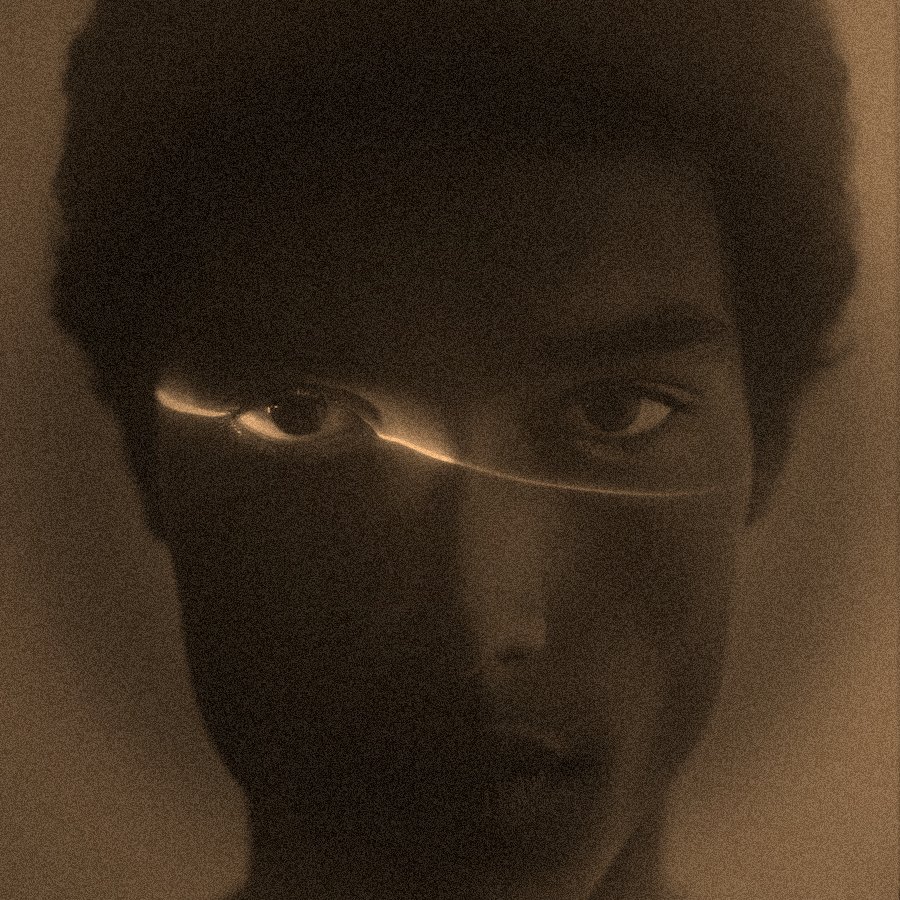
The sepia filter converts any source photo through a five-tone warm-brown palette, adds paper-grain and dust flecks so the surface reads as an aged print, then rounds the frame with a soft vignette. The image below shows a portrait rendered through the recipe.
/WHAT IT IS
Sepia toning is a 19th-century photographic process that replaced the silver in a black-and-white print with a warm-brown pigment (originally made from cuttlefish ink, called sepia). The result was more archival than plain silver and warmer to the eye, and for roughly forty years (1880-1920) every commercial portrait, wedding photo, and family archive was printed this way. Sepia is the palette people mean when they say “old photo,” “vintage photo,” or “antique portrait.” It sits between full colour and stark black-and-white and reads as time-shifted rather than either.
This filter replicates that palette digitally. Colour comes out, the image is remapped through a five-tone sepia dither (pale cream, warm buff, mid-tan, deep umber, near-black), and a paper-grain layer plus film dust flecks and a soft oval-frame vignette make the surface read as an aged print rather than a saturation-slider-dragged colour photo. Portraits pick up a genealogy-archive feel. Landscapes turn into travel postcards from a hundred years ago. Product shots become the merchandise page of a Sears Roebuck catalogue. Because the recipe is deterministic, running it across a batch of photos produces a coherent vintage series.
/RECIPE CODE
This is the exact code that reproduces every parameter of the sepia filter. Copy it, open the tool, click Recipes in the top bar, paste, hit Apply. Your image renders with the recipe.
recipe:v1:eyJ2IjoxLCJyZW5kZXJNb2RlIjoiZGl0aGVyIiwiZGl0aGVyQWxnbyI6ImF0a2luc29uIiwiZGl0aGVyUGFsZXR0ZSI6InNlcGlhIiwiZGl0aGVyQ29udHJhc3QiOjExOCwiZGl0aGVyU2NhbGUiOjIsInBmeCI6eyJmaWxtR3JhaW4iOnsiZW5hYmxlZCI6dHJ1ZSwiaW50ZW5zaXR5IjozMn0sInZpZ25ldHRlIjp7ImVuYWJsZWQiOnRydWUsImludGVuc2l0eSI6NDJ9LCJmaWxtRHVzdCI6eyJlbmFibGVkIjp0cnVlLCJkZW5zaXR5IjoxOH19fQ
The tool's Recipes modal parses this code and sets every field: dither render mode, Atkinson algorithm, Sepia palette, dither contrast 118, dither scale 2, plus film grain 32, film dust density 18, vignette 42. Same parameters, every time.
/APPLY IT IN A SECOND
Copy the code above, open the tool, paste, drop your photo. Four clicks total.
Hit the Copy recipe & open tool button below. Your sepia recipe code copies to the clipboard, and the editor opens in a new tab.
Click Upload or drag your image onto the canvas. Portraits, street scenes, product shots, and short videos all work.
The effect renders live on your photo in about a second. Hit Export for PNG at up to 4× resolution, or MP4 for a moving sepia clip.
Or grab it from the recipes hub. Every recipe on the site is one tap away in the recipes collection. Open the hub, hit Try this recipe on any card, drop in your image. Same result, if you want to browse other looks while you are there.
/ANATOMY
/HOW IT'S MADE
Open ASCII Magic, drop in a portrait, wedding photo, family archive scan, landscape, product shot or short clip. Sepia is forgiving, but images with clear mid-tone variation (a lit face, an open sky, a wooden floor) show off the five-tone remap best.
Switch to Dither mode, pick the Atkinson algorithm from the dropdown, then select the Sepia palette. Atkinson gives softer transitions between tones than Floyd-Steinberg, which suits the warm, aged look. Every pixel now remaps to one of five sepia tones.
Raise Dither Contrast to 118. That preserves the shoulder in the highlights and gives the shadows the deep-umber sit that period prints have, without collapsing anything to pure white or black.
Add film grain at intensity 32, film dust at density 18, and a vignette at intensity 42. Export as PNG at 2× or 4×, or MP4 for a moving sepia video (family-tree slideshows, historical-context clips, mood pieces).
/VINTAGE · OLD PHOTO · RETRO
Sepia is the shortest path to a vintage photo filter, an old photo filter, or a retro filter that actually looks aged rather than just desaturated. The same visual signature (warm-brown five-tone palette, paper grain, dust flecks, soft vignette) is what people mean when they say any of those phrases, especially for anything imitating photographs from before the 1930s. Family-history slideshows, ancestry.com uploads, historical-context editorial illustration, mood-board covers, book-cover art for period fiction, wedding-album vintage passes, and Instagram grids that want a coherent aged palette all lean on sepia. It reads instantly as “this photo is from a different time” without a single word of caption. The recipe here also doubles as a sepia converter, a sepia tone generator, and a plain old sepia photo online tool depending on how you find it, all the same page, same one-click flow.
/WHERE TO USE IT
Scanned family photos, ancestry uploads, memorial cards. Sepia unifies photos taken decades apart into one visual pass, useful when the originals are a mix of colour and B&W.
Any story set before 1940 benefits from a sepia cover. Wartime memoirs, Victorian mysteries, Western frontier tales. The palette signals period before the reader even reads the title.
Historical features, obituaries, retrospectives, archive pieces. Sepia signals “this is about the past” without needing a caption. Works on modern photos too when the intent is nostalgic.
Running six photos through the same recipe produces a curated sepia series that reads as one aged archive. Popular for travel photography, wedding recaps, brand campaigns leaning into heritage.
/RELATED LOOKS
If sepia is a step toward vintage but you want a full monochrome push instead, look at the Film Noir Photo Filter, which uses the same dither+grain+vignette DNA but in true black-and-white with harder contrast. For the underlying tool controls, the Dither style page covers all 15 algorithms and 16+ palettes (including sepia) that this recipe builds on.
/FAQS
/READY?
Upload a photo, get a vintage sepia print with warm-brown tones, grain, dust and vignette. Runs in your browser, free, no watermark.
Try this recipe →/MORE RECIPES
Each opens the editor with that recipe ready. Browse the full recipes collection.